Backend Quickstart
Use this guide to upload images from a backend service, import images from remote URLs, and issue upload tokens for signed frontend uploads.

The examples use Node.js first because @imgwire/node is the most common starting point for server-side web apps. Each section also includes Python, Ruby, and Go tabs with the same workflow.
Before you start
Complete the setup guide first so you have an Imgwire account, organization, and Environment.
For backend code, create a Server API Key and store it in a server-only environment variable such as IMGWIRE_API_KEY. Server keys can manage backend resources and create upload tokens. Do not ship a Server API Key to browser code, mobile apps, or public static bundles.
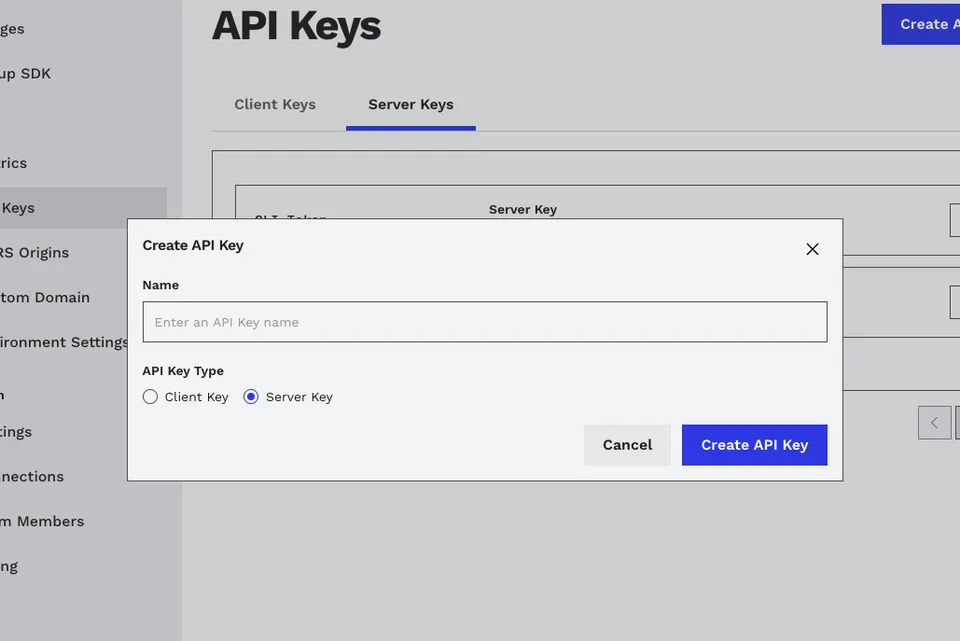
Create a Server API Key from the Imgwire dashboard API Keys page.
Install a server SDK
- Node.js
- Python
- Ruby
- Go
yarn add @imgwire/node
pip install imgwire
gem install imgwire
Or add it to your Gemfile:
gem "imgwire"
go get github.com/Blackhawk-Software/imgwire-go
Configure the client
Create the SDK client once and reuse it in your route handlers, workers, and background jobs.
- Node.js
- Python
- Ruby
- Go
import { ImgwireClient } from '@imgwire/node';

export const imgwire = new ImgwireClient({
  apiKey: process.env.IMGWIRE_API_KEY!,
});
import os
from imgwire import ImgwireClient

imgwire = ImgwireClient(api_key=os.environ["IMGWIRE_API_KEY"])
require "imgwire"

IMGWIRE = Imgwire::Client.new(api_key: ENV.fetch("IMGWIRE_API_KEY"))
package imgwireclient

import (
	"os"

	imgwire "github.com/Blackhawk-Software/imgwire-go"
)

var Client = imgwire.NewClient(os.Getenv("IMGWIRE_API_KEY"))
Upload from the filesystem
Use filesystem uploads when your backend already has the image bytes. Common examples include admin imports, background jobs, server-side image generation, scheduled media migrations, and files your backend receives from a private source.
The upload helper returns the created image record. Image records include URL helpers so your backend can generate transformed CDN URLs after upload.
- Node.js
- Python
- Ruby
- Go
import fs from 'node:fs';
import { imgwire } from './imgwire';

const image = await imgwire.images.upload({
  file: fs.createReadStream('uploads/hero.jpg'),
  mimeType: 'image/jpeg',
  purpose: 'marketing hero image',
  customMetadata: {
    source: 'server-import',
  },
});

const deliveryUrl = image.url({
  preset: 'medium',
  format: 'auto',
  quality: 'auto',
});

console.log(image.id);
console.log(deliveryUrl);
from imgwire_client import imgwire

with open("uploads/hero.jpg", "rb") as handle:
    image = imgwire.images.upload(
        handle,
        file_name="hero.jpg",
        mime_type="image/jpeg",
        purpose="marketing hero image",
        custom_metadata={"source": "server-import"},
    )

delivery_url = image.url(
    preset="medium",
    format="auto",
    quality="auto",
)

print(image.id)
print(delivery_url)
require_relative "imgwire_client"

File.open("uploads/hero.jpg", "rb") do |file|
  image = IMGWIRE.images.upload(
    file: file,
    file_name: "hero.jpg",
    mime_type: "image/jpeg",
    purpose: "marketing hero image",
    custom_metadata: { source: "server-import" }
  )

  delivery_url = image.url(
    preset: "medium",
    format: "auto",
    quality: "auto"
  )

  puts image.id
  puts delivery_url
end
package jobs

import (
	"context"
	"fmt"
	"os"

	imgwire "github.com/Blackhawk-Software/imgwire-go"
	"your-app/imgwireclient"
)

func UploadHero(ctx context.Context) error {
	file, err := os.Open("uploads/hero.jpg")
	if err != nil {
		return err
	}
	defer file.Close()

	image, err := imgwireclient.Client.Images.Upload(ctx, file, imgwire.UploadInput{
		FileName: "hero.jpg",
		MimeType: "image/jpeg",
		Purpose:  "marketing hero image",
		CustomMetadata: map[string]any{
			"source": "server-import",
		},
	})
	if err != nil {
		return err
	}

	width := 1200
	deliveryURL, err := image.URL(imgwire.ImageURLOptions{
		Width: &width,
	})
	if err != nil {
		return err
	}

	fmt.Println(image.Id)
	fmt.Println(deliveryURL)
	return nil
}
Upload from a remote URL
Use URL uploads when the image already exists at a temporary or public asset URL. This is useful when working with AI image-generation platforms such as GPT Images, where the generation API returns a temporary asset URL that your backend can hand to Imgwire for ingestion.
In this flow, your backend sends the source URL to Imgwire. Imgwire fetches the source image and creates an Imgwire image record for future CDN delivery and transformations. File name and MIME type fields are optional overrides; omit them unless your app needs to force those values.
- Node.js
- Python
- Ruby
- Go
import { imgwire } from './imgwire';

const generatedAssetUrl = 'https://temporary-assets.example.com/image.png';

const image = await imgwire.images.uploadViaUrl({
  url: generatedAssetUrl,
  purpose: 'ai generated documentation image',
  customMetadata: {
    source: 'gpt-images',
  },
});

console.log(image.id);
console.log(image.url({ preset: 'medium' }));
from imgwire_client import imgwire

generated_asset_url = "https://temporary-assets.example.com/image.png"

image = imgwire.images.upload_via_url(
    generated_asset_url,
    purpose="ai generated documentation image",
    custom_metadata={"source": "gpt-images"},
)

print(image.id)
print(image.url(preset="medium"))
require_relative "imgwire_client"

generated_asset_url = "https://temporary-assets.example.com/image.png"

image = IMGWIRE.images.upload_via_url(
  url: generated_asset_url,
  purpose: "ai generated documentation image",
  custom_metadata: { source: "gpt-images" }
)

puts image.id
puts image.url(preset: "medium")
package jobs

import (
	"context"
	"fmt"

	imgwire "github.com/Blackhawk-Software/imgwire-go"
	"your-app/imgwireclient"
)

func ImportGeneratedImage(ctx context.Context) error {
	generatedAssetURL := "https://temporary-assets.example.com/image.png"

	image, err := imgwireclient.Client.Images.UploadViaURL(
		ctx,
		generatedAssetURL,
		imgwire.UploadViaURLInput{
			Purpose: "ai generated documentation image",
			CustomMetadata: map[string]any{
				"source": "gpt-images",
			},
		},
	)
	if err != nil {
		return err
	}

	fmt.Println(image.Id)
	return nil
}
Issue upload tokens for signed frontend uploads
Signed uploads let your frontend use a publishable Client Key while your backend decides who is allowed to upload. Your frontend calls your backend, your backend checks the current user or request context, and your backend returns an Imgwire upload token.
Return the token using the shape expected by the frontend SDK examples:
{
  "uploadToken": "..."
}
For a full Next.js route example, see issuing Imgwire upload tokens from a Next.js API endpoint.
- Node.js
- Python
- Ruby
- Go
import { imgwire } from './imgwire';

export async function issueImgwireUploadToken() {
  // Authenticate the user and validate upload permissions here.
  const uploadToken = await imgwire.images.createUploadToken();

  return {
    uploadToken: uploadToken.token,
  };
}
from imgwire_client import imgwire


def issue_imgwire_upload_token():
    # Authenticate the user and validate upload permissions here.
    upload_token = imgwire.images.create_upload_token()

    return {"uploadToken": upload_token.token}
require_relative "imgwire_client"

def issue_imgwire_upload_token
  # Authenticate the user and validate upload permissions here.
  upload_token = IMGWIRE.images.create_upload_token

  { uploadToken: upload_token.token }
end
package uploads

import (
	"context"

	"your-app/imgwireclient"
)

func IssueImgwireUploadToken(ctx context.Context) (map[string]string, error) {
	// Authenticate the user and validate upload permissions here.
	uploadToken, err := imgwireclient.Client.Images.CreateUploadToken(ctx)
	if err != nil {
		return nil, err
	}

	return map[string]string{
		"uploadToken": uploadToken.Token,
	}, nil
}
Next steps
- Use the Frontend Quickstart to connect signed upload tokens to browser or mobile uploads.
- Review the Transformations API overview when your backend needs to generate custom CDN URLs.
- Use server-side URL uploads for generated images, imports, and media migration jobs where Imgwire should fetch the source asset directly.
Last updated at: May 9, 2026