Using the Imgwire MCP Server
Use the Imgwire MCP Server to connect AI coding agents to Imgwire image workflows through the Model Context Protocol. The hosted server is available at:
https://mcp.imgwire.dev/mcp
The MCP server uses OAuth-linked account access. After you add it to a compatible agent, the agent can authenticate through Imgwire, link the connection to an Environment, and use Imgwire tools without asking you to paste a Server API Key into chat.
Add the MCP server to Claude Code
For Claude Code, you can add the remote HTTP server with claude mcp add-json:
claude mcp add-json imgwire-mcp '{"type":"http","url":"https://mcp.imgwire.dev/mcp"}'
For a project-scoped .mcp.json file, use:
{
  "mcpServers": {
    "imgwire-mcp": {
      "type": "http",
      "url": "https://mcp.imgwire.dev/mcp"
    }
  }
}
After adding the server, start Claude Code and run /mcp to authenticate and inspect the connection.
Add the MCP server to VS Code
VS Code stores MCP servers in an mcp.json file. For a workspace-level configuration, create or edit .vscode/mcp.json:
{
  "servers": {
    "imgwire-mcp": {
      "type": "http",
      "url": "https://mcp.imgwire.dev/mcp"
    }
  }
}
VS Code can also add servers through the command palette with MCP: Add Server or MCP: Open User Configuration. After the server is configured, start it from VS Code and complete the OAuth flow.
Add the MCP server to OpenAI Codex
Codex connects to remote MCP servers from config.toml. Imgwire's Codex configuration must include oauth_resource:
[mcp_servers.imgwire-mcp]
url = "https://mcp.imgwire.dev/mcp"
oauth_resource = "https://mcp.imgwire.dev/"
Restart Codex after updating the config, then complete the OAuth authorization flow when Codex asks to connect to Imgwire.
Manage Authorized Connections
You can manage Authorized Connections from the Imgwire dashboard.
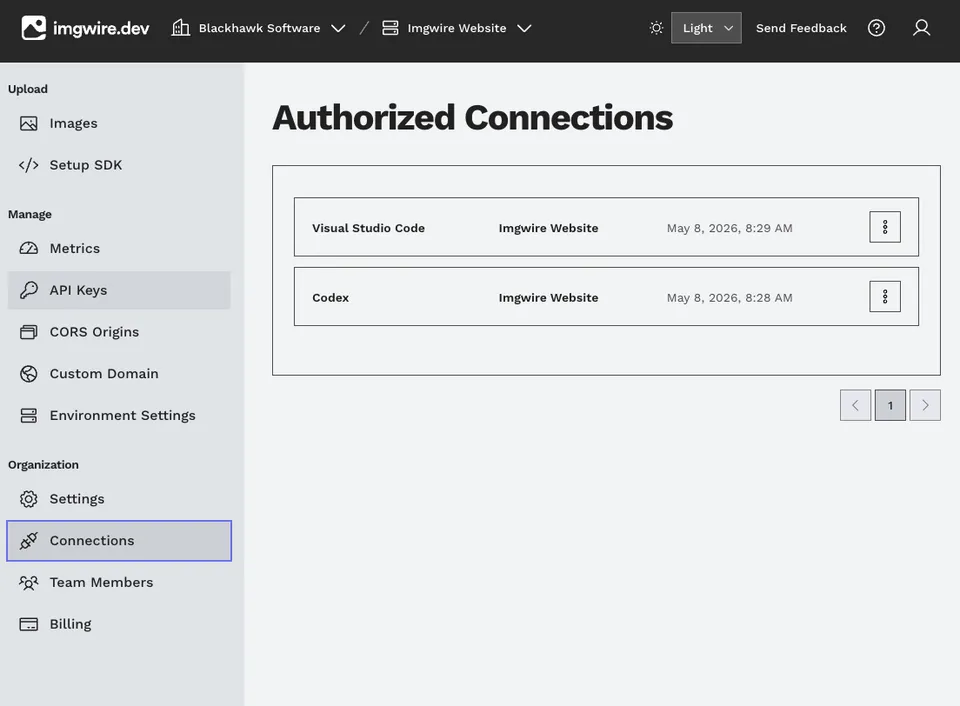
Manage AI agent MCP connections from the Authorized Connections page.
Authorized Connections must be scoped to a specific Imgwire Environment. You can manage that Environment binding from the dashboard. The MCP server can also ask your agent to choose an Environment through an explicit MCP elicitation when a tool call needs a linked Environment.
Available MCP tools
The hosted MCP server exposes Imgwire tools for common agent workflows. The tool surface intentionally avoids destructive image operations and does not create Server API Keys.
| Tool | Use |
|---|---|
whoami | Confirm the authorized user, organization, available Environments, and the currently linked Environment. |
create_client_token | Create publishable Client Keys for frontend SDK integrations. This tool creates client keys only, not server keys. |
upload_image_via_url | Import an image from a remote or temporary asset URL, such as a URL returned by an image generation API. |
upload_image | Create a standard upload and presigned upload URL for a local file. The agent uploads bytes directly to the returned URL. |
retrieve_image | Inspect an image record or poll after upload until it is ready for delivery. |
get_image_url | Generate transformed Imgwire CDN URLs for an image ID. |
list_images | List image records with pagination. |
fetch_metrics | Fetch Environment analytics for dashboards or troubleshooting. |
get_usage | Inspect current Imgwire platform usage relative to billing limits. |
create_bulk_image_download and retrieve_bulk_image_download | Prepare and inspect bulk image download jobs. |
get_server_token_dashboard_link | Return the dashboard URL where you can create a Server API Key yourself. |
Common agent workflows
Use MCP when an AI agent needs to work with Imgwire resources directly:
- Upload generated documentation or marketing images and replace local references with Imgwire CDN URLs.
- Import temporary image-generation URLs with
upload_image_via_url. - Generate
@medium,@large, or custom transformed CDN URLs withget_image_url. - Create a publishable Client Key for a frontend quickstart or demo app.
- Confirm which organization and Environment an agent is connected to with
whoami. - Inspect image delivery metrics while debugging an integration.
For application code changes, combine MCP with the Imgwire Agent Skill so the agent has both Imgwire account access and Imgwire-specific implementation guidance.
Security notes
The MCP server uses OAuth instead of asking for a Server API Key in chat. Server API Keys still belong in trusted backend, local, or CI environments only.
If an agent needs a Server API Key for CLI or backend work, create it from the dashboard yourself and store it in a server-only environment variable. The MCP server can provide a dashboard link for creating server keys, but it does not create or retrieve them.
Related pages
Last updated at: May 9, 2026